Vibe App Scanner (VAS) checks live applications for security vulnerabilities and other launch-readiness issues, with a particular focus on apps built using AI coding tools and modern no-code or development platforms. Enter an app’s URL to start a scan; VAS can identify exposed secrets, authentication and access-control problems, and platform-specific misconfigurations. Its reports rank findings by severity, explain the risks in plain English, show evidence, and provide remediation code that can be passed to a developer or AI coding tool.
Key features
Scans focused on modern app stacks
VAS scans a live app and automatically detects its stack, including technologies such as React, Supabase, and Vercel, as well as many other supported platforms. Its checks look beyond basic security headers: the product describes inspecting JavaScript, discovering APIs, testing database access controls, and checking authentication. Examples of issues it looks for include exposed API keys and tokens, misconfigured Row Level Security, missing headers, and access-control weaknesses.
For a manual scan, users can optionally provide credentials for a supported email-and-password login. VAS then checks a sample of protected pages and API responses. This can surface some problems that are only visible after signing in, but it is not an automated deep crawl or a complete access-control audit. Scheduled and API/MCP scans do not use saved login credentials.
Findings with explanations and fixes
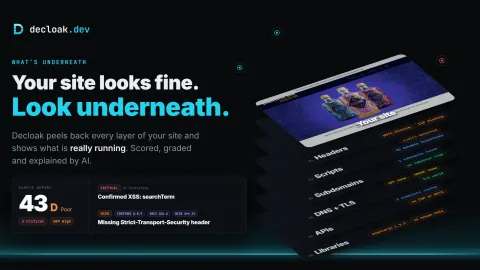
Results are ordered by severity, which helps teams prioritize issues rather than treating every alert as equally urgent. Each finding can include a plain-English explanation of the risk and raw JSON evidence showing what the scanner tested. VAS also provides copy-paste remediation code intended for an editor, developer, or AI coding assistant. After applying a fix, a team can scan again and compare results across deployments or environments.
The product also describes checks for performance, accessibility, SEO, compliance, email security, and AI search visibility. Breach monitoring is included in its broader suite. These additional checks give users a wider view of an app than a security-only scan, although they should not be mistaken for a guarantee that an app is ready or secure.
Source-code scanning in beta
In addition to website scans, repository scanning is available in beta. Users can connect an authorized GitHub repository or upload a ZIP file; reports can include file locations and guidance for issues such as exposed secrets, access-control problems, and unsafe input handling. The page warns that coverage varies by language, framework, and repository size, that some checks or AI reviews may be incomplete, and that a clean report does not guarantee security.
Who it is for
VAS is aimed at founders, small teams, and developers who ship apps built with AI coding tools or popular web platforms, but do not have a security specialist reviewing every release. Its explanations and suggested fixes may also help a less security-experienced builder understand why an issue matters and what to investigate next. Teams that want a quick check of a live app’s security, alongside basic launch-readiness signals, may find the combination useful.
Limitations
A scan is an aid to security review, not proof that an application is safe. Authenticated checks cover a sample of protected pages and responses rather than a complete audit, and saved login credentials are not used by scheduled or API/MCP scans. Repository scanning is explicitly in beta, with coverage limitations that depend on the codebase. The page does not establish that every framework or vulnerability class is covered, so teams with higher-risk systems may still need specialist testing.
Verdict
Vibe App Scanner brings security checks, understandable findings, evidence, and actionable remediation guidance into a workflow suited to AI-built applications. Its focus on common platform-specific mistakes makes it relevant to small teams that need help spotting issues before or after launch. Its reports are best treated as a practical starting point: the product itself notes that coverage can be incomplete, and some login-protected behavior is outside the scope of its standard checks. For teams that understand those boundaries, VAS can make recurring app checks more accessible and easier to act on.