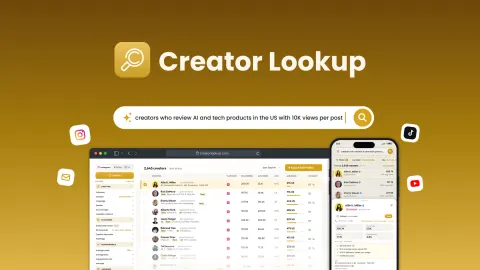
LeadLocator is a cloud-based prospecting tool for finding local businesses and collecting their contact details. Users search by keyword, industry, or location, then filter results and export them as CSV files for outreach or CRM workflows. Its focus is on reducing the manual work involved in building lists of local B2B prospects, rather than managing outreach after a list is created.
Key features
Search by business type and location
Search criteria can include a keyword, industry, category, city, state, or ZIP code. LeadLocator says its filters can also narrow results by region and ratings. This combination is intended to help users assemble lists around a specific market or business profile rather than collect broad, undifferentiated records.
Contact details and exports
The product organizes business information such as emails, phone numbers, addresses, websites, and company details. Results can be exported as CSV files, including in bulk, for use in outreach tools or CRM workflows. The page describes the files as clean and organized, but does not specify the fields available in every export or list particular CRM integrations.
Cloud-based extraction
LeadLocator runs in a browser and does not require software installation or technical setup. Its automated extraction process is described as running in the background, including after the browser is closed. That makes the workflow relatively straightforward: choose a country, enter search criteria, run the extraction, refine the results, and export the list.
The page describes the source as local business directories, but does not identify those directories. It also calls the contact information verified without explaining the verification method or how recently records are checked, so users may still want to review records before relying on them for a campaign.
Who it is for
LeadLocator is aimed at freelancers, consultants, marketing agencies, sales teams, SDRs, SaaS founders, recruiters, startups, and local service providers. It may suit people whose prospecting begins with finding businesses in a particular place or industry and who need a list of contact details to work with elsewhere.
The product appears most relevant to outbound prospecting and early-stage list building. Agencies could use searches to identify possible clients, while sales teams or founders might look for companies matching a defined market. Recruiters are also named as a target audience, although the described data focuses on business records and contacts rather than candidate profiles.
Limitations and considerations
LeadLocator is presented as a lead-discovery and export tool. The page does not describe built-in email outreach, campaign tracking, pipeline management, or CRM synchronization; it describes CSV exports for importing into other workflows. Teams looking for a complete sales engagement system should assess whether they need those functions separately.
Geographic coverage is not described consistently. The main feature summaries list the USA, Canada, UK, France, and Germany, while the setup instructions also include Australia and Switzerland. The page does not clarify whether those additional countries are supported across all search types. It also gives no detail about the directories used or the process behind its “verified” data claim. The page shows no customer reviews, so it provides little user feedback to help evaluate results in practice.
Verdict
LeadLocator offers a simple, focused workflow for discovering local business prospects, filtering records, and exporting contact lists. Its browser-based operation and CSV exports may be useful for individuals and teams that already have a separate outreach or CRM process and want to reduce manual research. The main points to check are the actual country coverage for a target market and whether the available contact data meets the team's verification and quality requirements.